Part 7: NL2SQL Agent with the IBM CE Accelerator
Outcome: An editable draft agent that answers natural-language questions against the workshop PostgreSQL database.
This is a mandatory standalone use case. It does not rename or modify the customer-support system from Parts 2–7.
What we will implement
You will discover the workshop PostgreSQL schema, generate an editable natural- language-to-SQL draft agent, validate and deploy it, then test questions against the discovered tables and metadata.
The accelerator performs database discovery and initial agent generation in its own UI. Bob resumes as the development interface after the generated agent is available in the participant project or Orchestrate environment.
1. Open the accelerator
Open the verified IBM CE NL2SQL Accelerator.
This step runs entirely in the accelerator's own web UI, not in Bob IDE.
2. Run data discovery
Expand Database Connection. The workshop PostgreSQL values are normally already filled in — if they are, change nothing and start discovery.
If the fields are empty, ask the instructor for the shared workshop database values and enter those. Do not enter personal or production database credentials.
Connection environment — select IBM Cloud
When the Connection Environment option appears, select IBM Cloud instead of Local. The workshop database is hosted on IBM Cloud; using the Local option will cause the connection to fail.
Start discovery and wait for it to complete.
Review the discovered tables, relationships, and descriptions. Correct unclear table or column descriptions before generating the agent; this metadata affects SQL quality.
3. Connect watsonx Orchestrate
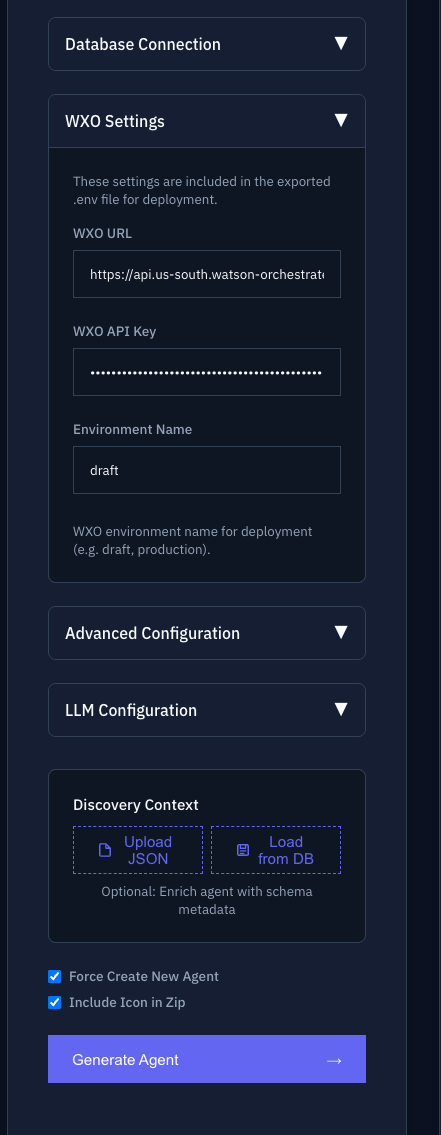
Expand WXO Settings and fill in the three fields. These are the same two credentials you saved in Prerequisites and used in Part 1 — there is no separate key to create here:
| Field in the accelerator | What to enter |
|---|---|
| WXO URL | Your Instance URL, pasted whole |
| WXO API Key | Your watsonx Orchestrate API key |
| Environment Name | draft |
Treat the API key like a password. Enter it only in this form, never in Bob chat.
Select Generate Agent.
Warning
Do not continue while WXO Settings Incomplete or another configuration warning remains. Save or re-enter the settings and regenerate the summary.
4. Validate and deploy the draft
Review the generated agent name, tools, and warnings.
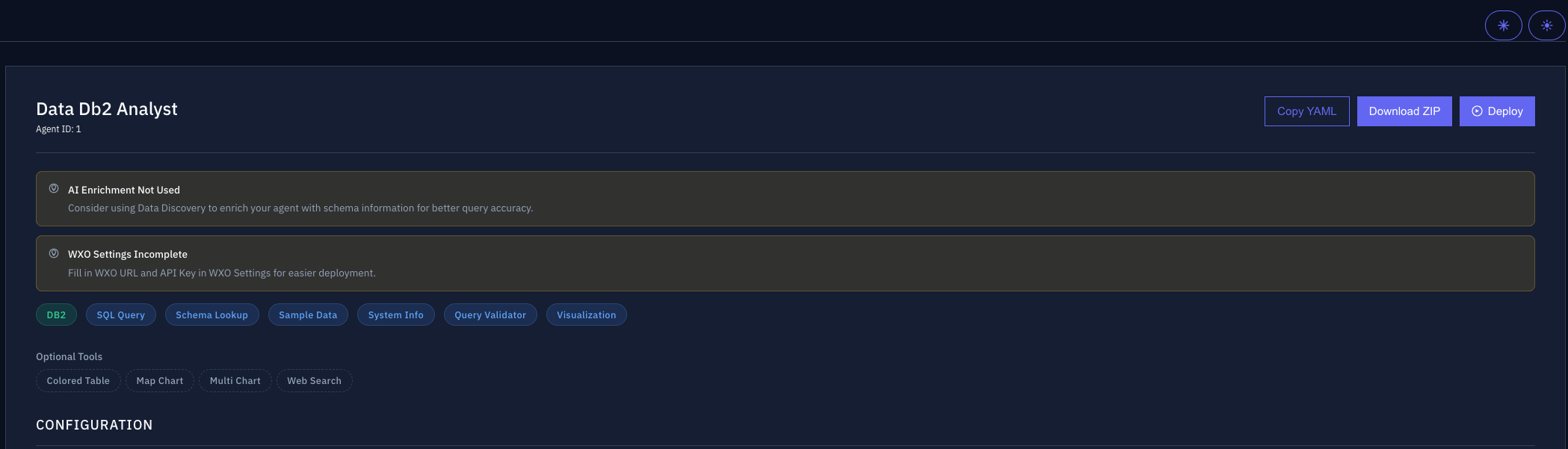
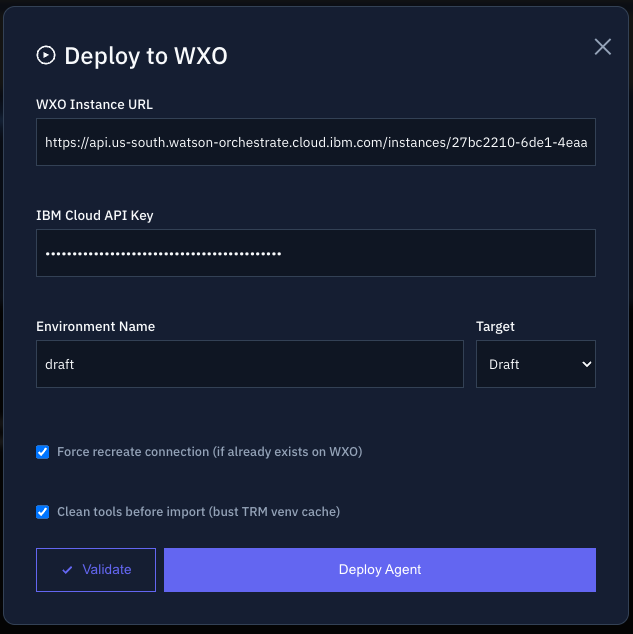
Select Deploy, then:
- Confirm the instance URL.
- Select Validate.
- Continue only after validation succeeds.
- Select Deploy Agent.
5. Test the agent
Open the generated agent in watsonx Orchestrate and try:
What were total units sold and net revenue on January 1, 2024?Which month in 2024 had the highest net revenue?How many active stores are open on Shabbat?
Check that:
- the generated SQL uses the intended tables and filters
- totals and dates are plausible
- the agent explains when a question cannot be answered from the discovered schema
- no unrestricted or sensitive table is exposed
The result may include a chart:
6. Continue with Bob
Confirm Bob's mode before continuing
You just worked in the accelerator's own UI, outside Bob IDE. Before asking Bob anything below, check the mode selector in the chat input box and confirm it still reads WXO Agent Architect.
The generated agent is editable. In Bob, ask:
Inspect the generated NL2SQL agent without changing it. Summarize its tools,
data-access boundaries, and current safeguards. Recommend one small improvement
and cite the ADK documentation that supports it.
Choose one recommendation, then ask:
Implement the approved improvement in the generated NL2SQL project. Preserve
its existing database tools and data-access boundaries. Validate every changed
artifact, import or re-import it into draft using the existing .venv, and
suggest test prompts for a valid query, an unanswerable question, restricted
data, and ambiguous business language. Show me the changes and import results.
Possible improvements include guidelines for allowed query types, clearer refusals for restricted data, or a collaborator that explains results using approved business documentation.
Checkpoint
- Discovery completed before agent generation
- Metadata was reviewed
- WXO validation succeeded
- The agent was created in draft
- Three sample questions were checked against the database schema
- Data-access limitations are understood
- Bob reviewed and tested one approved improvement
You have completed the mandatory workshop path.